Currently, monitoring out-of-stock situations is challenging, as it relies on regular store visits. Another issue is tracking market cycles, such as whether certain products are even sold during specific weeks of the year.
Why we’re better
By utilising Nielsen Product Locator sales data, seQ Product Monitoring allows for effective monitoring of sales performance at POS and automates the identification of stocking issues.
Benefits
Empower Your Retail Success
Discover how our platform's advanced features—like dynamic clustering algorithms, real-time insights, and predictive analytics—empower you to drive smarter growth.
Unemployment rate, inflation (provided by seQ technology)
Sociodemographic Data
Purchasing power index by postcode, age in the region (provided by seQ technology).
Step-by-Step Process
Map the customer journey
You provide us with your data, which we cluster in the background. We identify lookalikes for you and perform value-based segmentation.
1- Initial Data Collection
Nielsen ID: The user provides their Nielsen ID.
Data Review: We check if the correct data, such as Historic Sales Performance Data, is available or needs to be acquired.
Data Provision: The data is provided to the customer’s cloud (S3, Azure, Snowflake, etc.).
2- Data Processing
Portfolio: The user supplies an Excel list of their portfolio per POS.
GTIN List: We receive a GTIN list with all the user’s products and identify the core and top products.
Assignment: The user assigns the core portfolios either regionally or at the supermarket level.
seQ Pipeline: Our seQ Pipeline processes, enriches, and clusters the data using
Machine Learning with Product Locator data (current sales data).
Monitoring: We monitor the products being sold at POS.
Detection: Data is processed to detect out-of-stock situations.
3- Field Team Setup
Team Creation: The user sets up their field team via an Excel list (the master template is provided by our system).
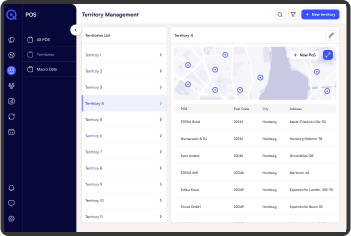
Assignment: Employees are assigned to specific territories, and relevant details are recorded (name, email, contact, position, territory, skillset).
4- Define Relevant Triggers
Set Triggers: Together with the user, we define relevant triggers, e.g., when three SKUs haven’t been sold at a specific POS in the last week.
Verification: We verify whether the products are part of the core portfolio and assigned to a territory.
Notification: Depending on the territory, the relevant field employee is notified, or an email is sent to the regional manager.
5- Automated Workflows
Define Logic: The user defines the logic for how automated actions are implemented (e.g., email notifications).
Select Modules: The user can choose from various modules which triggers will activate specific actions. Templates are available to simplify the process.
Automation: Once set up, the automation workflows run parallel and automatically until the user intervenes.
6- Actions
Measures: Based on these notifications, targeted actions can be taken to optimise sales strategies.
Combine Use Cases: You can combine Use Case 1 and 2. Once the workflows are set up, the same system can also be applied to lookalikes, enabling a global strategy to be implemented locally.
Additional information
Explore Similar Solutions
Currently, FMCG brands find it challenging to monitor out-of-stock situations as it often relies on regular store visits. However, with shopeyeQ using Nielsen Product Locator sales data, sales performance at POS can be effectively monitored, and stocking issues can be automatically identified. We handle the daily monitoring of your products at POS and process this data to detect out-of-stock situations.
Together with you, we define relevant triggers, such as when a SKU hasn’t sold at a particular POS for the last three weeks. Our Product Monitoring then checks whether the affected products are part of your pre-defined core portfolio and assigned to a territory. Depending on the territory, the relevant field employee is notified, who can then take targeted actions to optimise sales strategies, or an email is sent to the regional manager. This all depends on the triggers you have customised to suit your needs.
With shopeyeQ Product Monitoring, you ensure your key products are consistently available, reducing out-of-stock times. Additionally, shopeyeQ Product Monitoring ptimises the use of field teams by directing them precisely where they are needed.
Case Study
Optimizing Retail Insights
This section presents a series of case studies that demonstrate the transformative impact of POS clustering on retail operations.